 Podwobble
How to make YouTube Shorts from a podcast
The short answer: a YouTube Short is any square or vertical video up to three minutes long. For an audio-only podcast, cut a moment that stands on its own, turn it into a 9:16 video with a photo, a moving waveform and captions, upload it in YouTube Studio and link it to the full episode.
Most guides to podcast Shorts start from camera footage: record the show on video, let an AI tool find the highlights, reframe them to vertical. If your podcast is audio only, that advice skips the part you need, which is where the picture comes from. This guide covers that, plus the YouTube rules that catch podcasters out: the one-minute line for clips with a copyright claim, which for podcasts usually means music, and how to send Shorts viewers to the episode. I make Podwobble, a Mac and Windows app for turning audio into video, so the making step uses it; the YouTube parts apply whatever you make the video with.
What counts as a YouTube Short?
Shape and length decide it. YouTube says videos “with a square or vertical aspect ratio up to three minutes in length will be categorized as Shorts” (YouTube Help). On a computer you upload a Short in YouTube Studio the same way as any other video; the shape and length do the rest.
Square counts, but a 9:16 video fills a phone screen, so make it your main version. A 16:9 clip is a normal video, however short it is.
Can you make Shorts from an audio-only podcast?
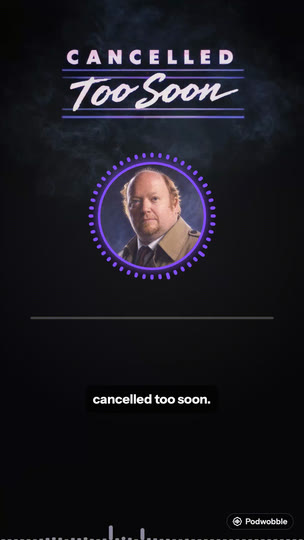
Yes. A Short needs moving pictures, not camera footage. For a podcast that usually means three things over the audio:
- An image. The host’s photo, the show art, or both, so the clip is recognisably yours.
- Something that moves with the sound. A waveform or a ring around the photo tells someone swiping past that this is speech, not a still.
- Captions. They let people follow along without sound and keep a viewer reading when the speaker pauses.
On a two-host show it helps if each host’s waveform moves only when that host talks. Then the video shows who is speaking without anyone on camera. More on the ingredients in turning a podcast clip into a video.
How long should a podcast Short be?
Up to three minutes is allowed, but for most podcast clips the line that matters is one minute. YouTube blocks “any Short that is over one minute in duration with an active copyright claim of any type, including manual claims”, and the block is global (YouTube Help).
Over a minute, one claim and the Short is blocked everywhere. For a podcast, the usual risk is music: a theme tune, a sting, a bed under the intro. So:
- If the clip is pure conversation with no music or other material you don’t own, you can go past a minute when the moment needs it. A claim can still arrive by mistake, so check the video in Studio after it goes up.
- If there is any music you don’t own outright, cut it out of the clip or keep the Short under a minute.
Whatever the length, end the clip when the thought ends. A clip that stops mid-sentence to hit a number feels cut short.
Which moment should you cut?
One that makes sense to someone who has never heard the show. Good candidates: a clear opinion, a surprising fact, a short story with an ending, an answer to a question people search for. Skip the intro, the sponsor read and anything that leans on “as we were saying”. One episode often has several such moments; you don’t need to post them all on the same day.
How do you make the Short in Podwobble?
The steps are the same on a Mac and a Windows PC.
- Voices. Import the full episode (MP3, WAV, M4A, FLAC, AIFF or Ogg). Give each host a photo, a name and a colour. If you have each host’s solo recording, add it too: Podwobble uses it to work out who is talking when, and it never appears in the video.
- Look. Pick a template or build your own: a reactive ring or a bounce on the host photo, or a standalone waveform (EQ Bars, Rise, Wave, Dots). Add a name plate, your logo or a progress bar if you want them, and save it as a template so the next Short starts with the same look.
- Captions. Transcribe on your computer; the audio isn’t uploaded. Words can light up as they are spoken, in each host’s colour. Transcription is English only; for another language, bring your own file with Import SRT/VTT….
- Export. Set in and out points around the moment, tick 9:16 (and 4:5 or 1:1 if the same clip is going to Instagram or LinkedIn) and export. Every shape renders in one go as an MP4 at 30fps with the captions burned in.
Because you work from the full episode, the next Short is just a new pair of in and out points with the same look. Podwobble is free with a small mark in the corner of each export; Pro removes it.
How do you upload a Short from a computer?
In YouTube Studio: click Create in the top-right corner, choose Upload videos and select the 9:16 file (YouTube Help). Give it a title that says what the clip is about, not just the show and episode number; YouTube allows up to 100 characters (YouTube Help). Someone meeting the show through a Short doesn’t know what episode 112 is.
How do you send Short viewers to the full episode?
Set the episode as the Short’s Related Video. Viewers then see “a clickable link below your channel handle”. In YouTube Studio, go to Content, open the Short, select a related video from your channel and click Save. The episode has to be public or unlisted (YouTube Help).
This needs advanced feature access. An established channel will likely qualify automatically; otherwise YouTube offers ID or video verification, though not to every creator (YouTube Help). Worth sorting out before your first Short, so every clip points somewhere from day one.
Keep Shorts out of your podcast playlist. YouTube treats a podcast as a playlist of full episodes and says not to add podcast features to a clips playlist; it also says Shorts made to support a podcast won’t appear in YouTube Music (YouTube Help). If you haven’t put the full episodes on YouTube yet, here’s how to turn a podcast into a YouTube video.
What if the episode is already on YouTube?
YouTube Studio has a tool that cuts segments from your own long videos and publishes them as Shorts: Content, then the video, then Clips and Shorts, Create clip or Short and Short (YouTube Help). It works from the video you uploaded, so the Short can only show what that video shows. If the episode went up as one still image, the Short will be a still image too. Studio can add automatic captions where available and lets you restyle them, but it can’t put a moving waveform on an episode that went up as a still image. Making the clip yourself is what gives you that. One thing the Studio tool does for you: it links the Short back to the source video as its related video automatically, unless the Short is private, unlisted or made for kids.
The rules at a glance
| Question | Answer |
|---|---|
| Shape | Square or vertical; make 9:16 your main version |
| Length | Up to 3 minutes |
| Over 1 minute with a copyright claim | Blocked worldwide, so keep music out or stay under a minute |
| Uploading from a computer | YouTube Studio, Create, Upload videos |
| Linking to the episode | Related Video, with advanced feature access |
| In the podcast playlist? | No: full episodes only |
Questions
Can I make YouTube Shorts from an audio-only podcast?
Yes. Pair the audio with the host’s photo or show art, a waveform that moves with the voice, and captions, then export it as a 9:16 video. No camera footage is needed.
Why was my podcast Short blocked?
Most likely it is over one minute long and has a copyright claim, often on music. YouTube blocks those Shorts worldwide. Cut the music out or trim the clip to under a minute and upload it again.
Will a square video count as a Short?
Yes, if it is three minutes or shorter. A 9:16 video fills a phone screen, so use square only when one file has to serve several platforms.
Can I make Shorts for free?
Yes. Podwobble is free for unlimited exports with a small mark in the corner, and there are other free routes compared in turning a podcast into a video for free.
Does Podwobble post the Short to YouTube for me?
No. It saves the MP4 on your computer and you upload it in YouTube Studio, which is also where you set the title and the related video.
Make your first podcast Short today. Podwobble is free for Mac and Windows, with a small mark on exports.
Written with the help of AI, from my notes on how Podwobble works. Facts are checked against the linked sources.