 Podwobble
Podwobble for Mac and Windows
Audio in.
Social video out.
Make your audio worth watching. Drop in a podcast, an audiobook or any recording, add a photo, captions and your branding, and export for Reels, Shorts, TikTok and YouTube in one go.
The short version
See it in 38 seconds.
Waveforms
A waveform that moves with the person talking.
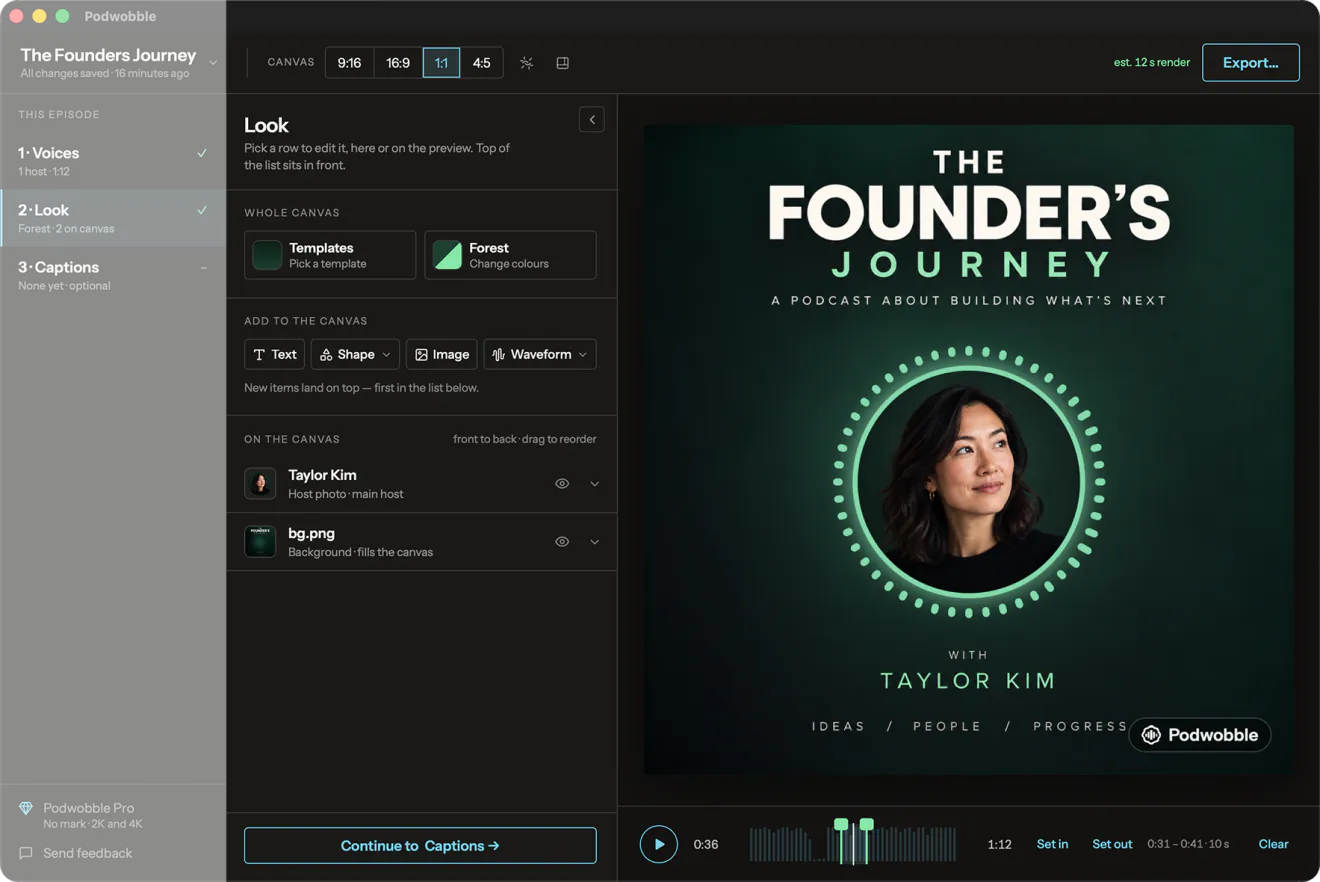
The ring sits around the host photo and reacts to that host’s own voice, so a two-person episode reads at a glance: whoever is speaking is the one who moves. Prefer it plain? Four standalone waveform styles sit anywhere in the frame. Any colour, any size, plus your own text, logo, shapes and images on top.
-
The ring
Wrapped around a host photo
-
EQ Bars
Classic spectrum bars
-
Rise
Steps up with the voice
-
Wave
One continuous line
-
Dots
Beads that light up
Made with Podwobble
Every format, one render.
Pick the shapes you post in and they export together as H.264 MP4 at 30fps.
Before your first video
Bring your audio.
Gather your artwork.
Start with a built-in template, or bring a design from your designer or ChatGPT. Keep the images separate so you can arrange them around the animation and captions.
File checklist and design brief →- Finished episode audioRequired. The complete recording, with music and edits, that your audience will hear.
- Host imagesA photo or illustration for each host you want on screen.
- Separate host recordingsFor animation that follows each voice. Export each host alone with the same start, edits and silent gaps as the finished episode. One host can get started with just the episode audio.
- Your logo OptionalA separate transparent PNG is easiest to place.
- A background image OptionalLeave space for hosts, waveforms and captions, or use the built-in colours and templates.
How it works
Four steps, in that order.
-
01
Voices
Bring in the episode as MP3, WAV, M4A, AAC, FLAC, Ogg or Opus, then give each host a photo, a name and a colour. Add a separate voice recording for each host whose animation should follow their own voice. Keep each file aligned with the finished episode. These recordings control the animation; the episode audio is what your audience hears.
-
02
Look
Start from one of six templates or build it yourself: four waveform styles, seven palettes or your own colours, a reactive ring or a bounce on the host photo, name plates, a progress bar, your text, your logo, a background image. Drag anything on the preview to place it, then save the look for next week.
-
03
Captions
Transcribe the episode on your own machine. Captions can light each word as it is spoken and take each host’s colour, in a box or as outlined text. Transcription is English; for anything else, import an SRT or VTT.
-
04
Export
Export the whole episode, or set a clip start and end. Every format you picked renders in one go as H.264 MP4 at 30fps, captions visible in the video,
.srtand.vttsaved alongside if you want them.
Privacy
Your work stays on your computer.
Nothing you make leaves your machine. No account, nothing to sign in to. Your audio, photos, captions and projects stay on your computer, and the speech model that writes the captions ships inside the app. The version downloaded from this site goes online to check for updates and, if you activate Pro, to check your license. Your project files stay on your computer.
A project is one .podwobble file with copies of everything it uses, so you can move it, back it up, or open it on another machine with nothing missing.
Price
Free, with a small mark.
Unlimited projects and unlimited exports on the free app. Every free export carries a small Podwobble mark in the bottom-right corner. Pro removes it and unlocks 2K and 4K.
- FreeUnlimited projects and exports, small mark $0
- Pro monthlyNo mark · 2K and 4K $9.99
- Pro yearly Most popular7 days free, then $59.99 for the year. Works out to $5 a month. $59.99
- Pro lifetimeOne payment, no subscription $99.99
In the direct-download app, choose Pro to buy through Polar, then paste in the license key emailed to you. One key covers up to 3 computers, Mac or Windows. The App Store version uses your Apple ID; purchases do not transfer between versions. Subscriptions renew until cancelled where you bought them. If Pro lapses, new exports return to 1080p with a watermark; existing videos stay as they are. Purchase terms
Get Podwobble
Download it and make one today.
Windows
Installing on Windows
The installer isn’t code-signed yet, so Windows may stop it the first time. If you see “Windows protected your PC”, click More info, then Run anyway.
If it won’t open at all, right-click Podwobble-Setup.exe, choose Properties, tick Unblock at the bottom of the General tab, click OK and run it again.
It installs for your account only, with no admin password, and updates itself after that. Stuck? Write to support@podwobble.com.